

Electronic Books Preservation Act — Overview
How niyase satisfies each category of Japan's Electronic Books Preservation Act — the method used to ensure authenticity, hardware requirements, retention periods, and the internal rules you must keep on file. Per-category procedures live on the following pages.
The pages in this "Electronic Books Act" category explain how niyase satisfies the storage requirements of Japan's Electronic Books Preservation Act (電子帳簿保存法), and what you need to do to keep that true in daily use.
Procedures for each category are on the pages below. This page covers what is common to all of them: the forms niyase ships in, hardware requirements, retention periods, and the rules you must keep on file.
| Chapter | Page | Article |
|---|---|---|
| 2 | Electronic books (creating and storing books) | Art. 4(1), Art. 8(4) (reliable electronic books) |
| 3 | Storing electronic transaction data | Art. 7 |
| 4 | Scanner storage | Art. 4(3) |
| 5 | Copies of documents you issue | Art. 4(2) |
About the numbered headings: Headings carry fixed section numbers such as
2.4. They exist so a requirement can be traced to the exact passage that answers it, so the numbers are never renumbered when the text is revised. New material is added as sub-numbers (2.4.1).
About the screenshots: The screenshots on these pages show the Japanese interface, because they double as the figures in the manual submitted for JIIMA certification. Menu and button names are given in English in the text; the interface itself is translated.
1.1 Categories of the Act and the matching menus
The Act splits requirements by what you are storing electronically.
| Category | What is stored | Menu |
|---|---|---|
| Electronic books | Books you keep yourself (journal, general ledger) | Accounting → Accounting |
| Electronic transactions | Invoices and receipts received or sent electronically | Accounting → Evidence storage |
| Scanner storage | Paper documents converted to images | Accounting → Evidence storage |
| Electronic documents | Copies of documents you created and issued | Created in Receivables; copies land in Evidence storage |
The Guide tab of the Evidence storage menu summarises the current status and the flow from intake to audit response.
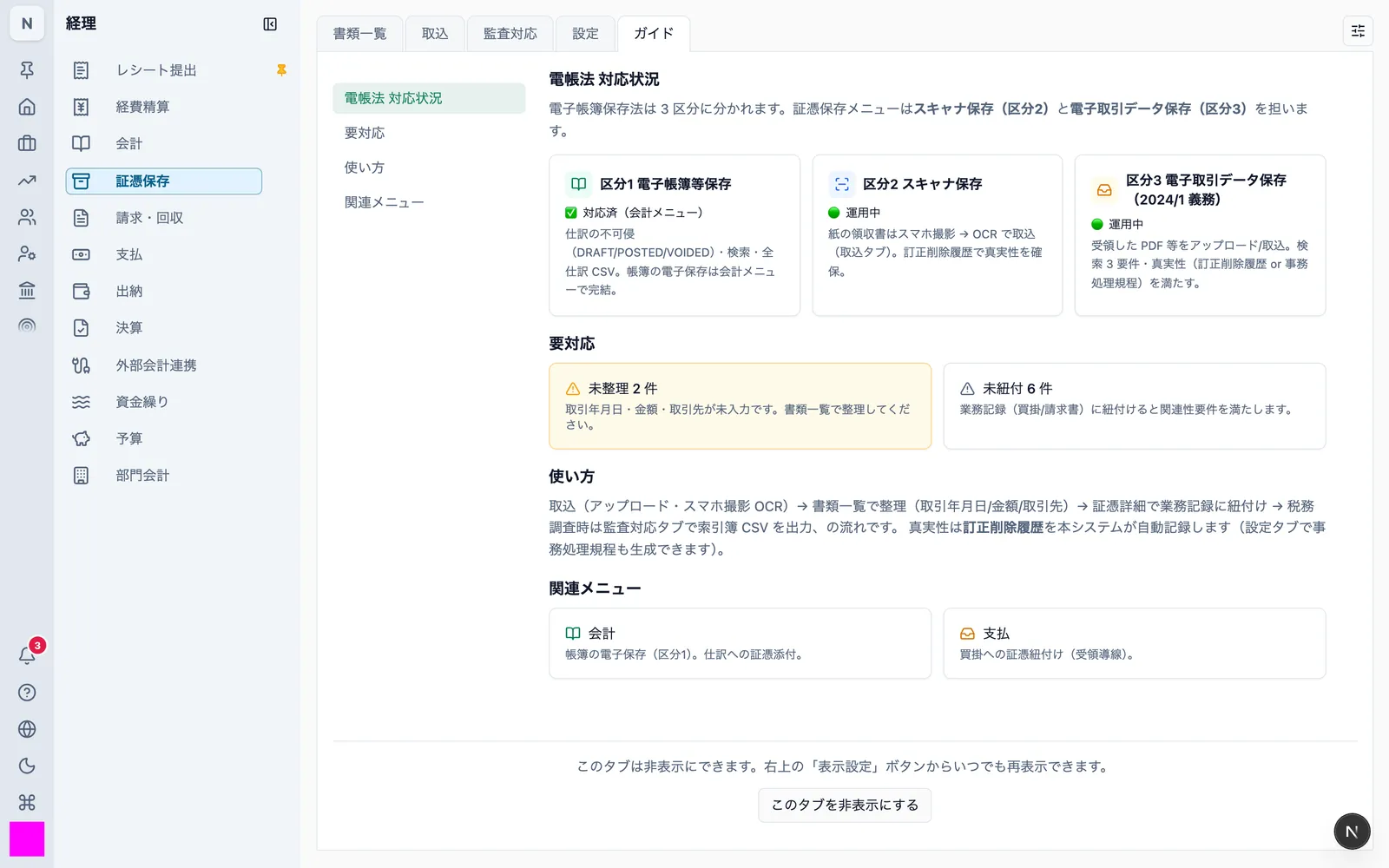
1.2 How authenticity is ensured
The Act requires that stored data can be shown not to have been altered afterwards. It accepts any one of three methods:
- Applying a timestamp
- Using a system that keeps a history of corrections and deletions
- Adopting internal rules that prevent corrections and deletions
niyase uses the second method — a system that keeps a history of corrections and deletions. Timestamps from a time-stamping authority are not used.
- Correcting the metadata of a document (transaction date, amount, counterparty) automatically records the value before, the value after, the reason, who did it, and when
- Deletion is logical only. Neither the record nor the stored file is removed. Deletion and restoration are recorded in the history as well
- There is no feature that deletes the history itself
- Journal entries cannot be edited once posted. Corrections take the form of a void plus a new entry, so both remain in the books
Templates for the internal rules under method 3 can also be produced by the product (1.7).
1.3 The three forms of the product
niyase ships in three forms, and each of them is a complete business system on its own.
| Form | Runs on | Where business data is stored |
|---|---|---|
| niyase Cloud | A browser | A database in the cloud |
| niyase App for Desktop | Windows / macOS / Linux | A database on your own machine |
| niyase App for Mobile | iOS / Android | A database on your own device |
Desktop and Mobile treat the on-device database as the single source of data and work fully offline. Syncing to the cloud is optional; the storage requirements of the Act are met even without it.
The processing that the Act's requirements depend on — searching books, assembling the ledger, producing CSV output, generating the evidence index — is the same shared program in all three forms. Changing form does not change the result.
The procedures on each page note only the places where the three forms differ. Anything not called out works the same way everywhere.
When syncing with the cloud: In a synced space, what reaches the device is the data that has been synced. The original file of a document is kept in one place in the cloud, and only a small preview image is sent to devices. Opening an original requires an internet connection (3.7).
1.4 Hardware requirements
The Act requires stored data to be output to screen and paper in an orderly format, clearly, and promptly. The equipment for that must meet the following.
Required
| Equipment | Requirement |
|---|---|
| Display | A colour display of 14 inches or larger |
| Printer | A colour printer capable of 200 dpi or higher |
| Network | An internet connection when syncing with the cloud, and when viewing or retrieving originals |
Requirements for the capture device used in scanner storage are in 4.4.
Supported platforms
The current version of each platform is what we support.
| Form | Environment |
|---|---|
| niyase Cloud | Current versions of Google Chrome, Microsoft Edge, Safari, Firefox |
| niyase App for Desktop | Current versions of Windows, macOS (Apple Silicon and Intel), Linux |
| niyase App for Mobile | Current versions of iOS and Android |
Older versions may work, but support and bug fixes target the current version.
1.5 Retention periods
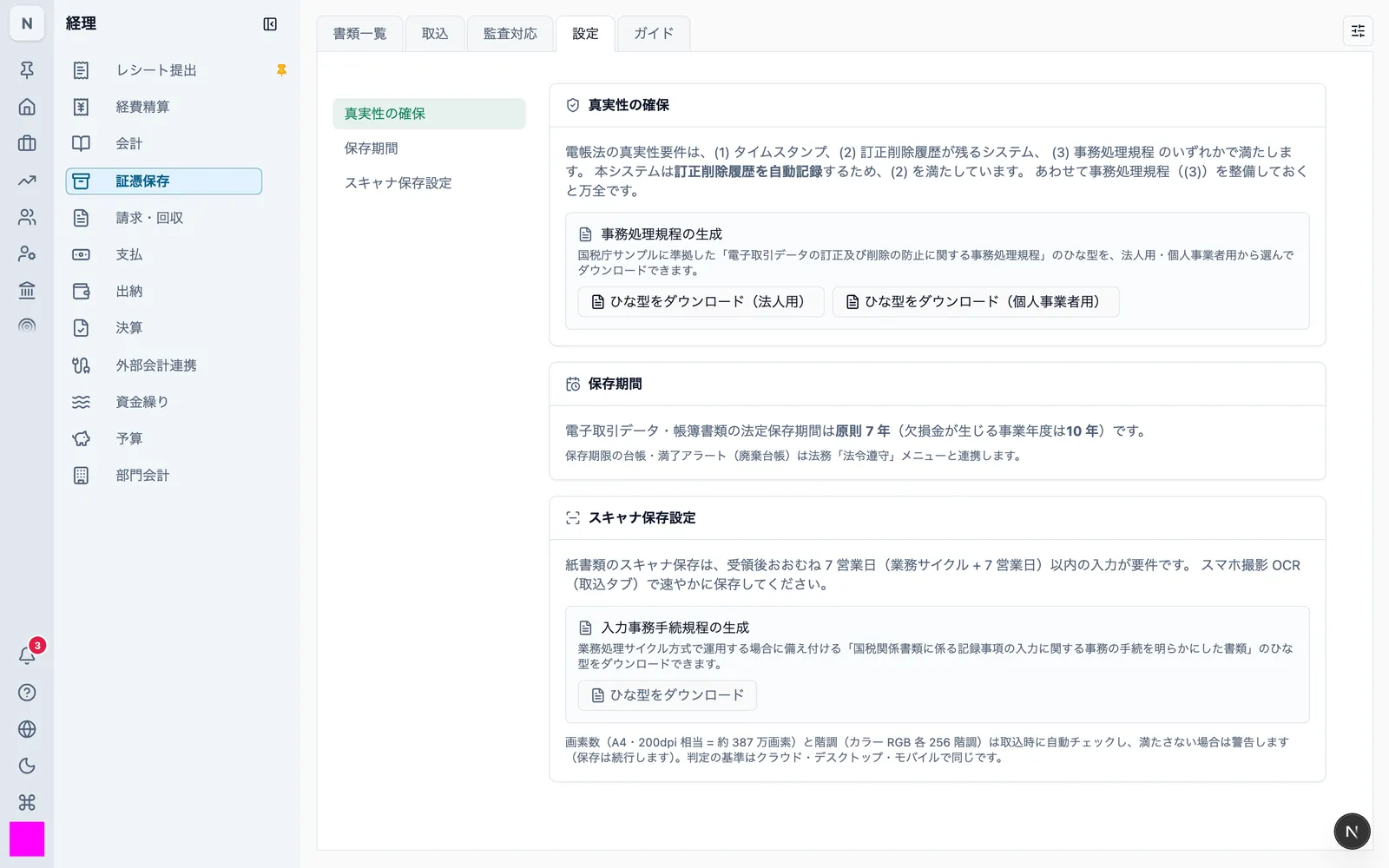
The statutory retention period for national-tax books and documents is seven years as a rule, and ten years for a fiscal year in which a loss arises.
niyase does not cap the retention period. Within it, nothing is physically removed by a user action.
- Documents are only ever deleted logically; both the record and the stored file remain
- Journal entries can no longer be deleted once posted (only drafts can be deleted)
The Settings tab of the Evidence storage menu shows the retention setting and how expiry is handled.
1.6 Access control and the operation record
- Users are identified by a login ID. Sign-in uses a password, a passkey, or a linked external identity
- Viewing and editing books and documents is governed by operation permissions. Users without the permission do not see books or documents at all
- Permissions are enforced in the database as well as in the application. Bypassing the application check still does not return another space's data
- Storing, correcting, deleting, and exporting are recorded in the audit log
See Members and invitations for permission setup and Sign-up and login for authentication.
1.7 Producing templates for the rules you keep on file
Separately from what the software does, the Act requires you to adopt internal rules and keep them on file in some situations. niyase produces templates that follow the National Tax Agency's samples.
| Template | When it is needed | Where to get it |
|---|---|---|
| Rules for preventing correction and deletion of electronic transaction data | When storing electronic transaction data (corporate and sole-proprietor versions) | Evidence storage → Settings → Ensuring authenticity |
| Document describing the procedure for entering records of national-tax documents | When running scanner storage on the business-cycle method | Evidence storage → Settings → Scanner storage settings |
Important: niyase satisfies the authenticity requirement as a system that keeps a correction and deletion history, but you must also adopt rules that in principle prohibit correcting or deleting electronic transaction data you have received. Download the template above, adapt it to how your organisation actually works, and keep it on file.
All three forms produce the same templates. Desktop and Mobile can produce them offline.
1.8 Backups
| Form | Backup |
|---|---|
| niyase Cloud | Automatic database backups and point-in-time restore are configured on the operations side |
| niyase App for Desktop / Mobile | The on-device database is the store. Export with the app's backup feature, or add cloud sync for redundancy |
See Backup and restore.
1.9 Migrating to and from other systems
Stored data can be taken out using the product's own features. No request to an operator is involved.
| What you can export | Format |
|---|---|
| Books | All journal entries as CSV; general ledger as CSV |
| Document index | CSV (transaction date, amount, counterparty, file name, type, upload date) |
| Original files | Individually, or as a zip for a date range (index CSV plus originals) |
| The whole space | A zip of CSV files and attachments, including document originals and their past versions |
As the system you are leaving
If you move from niyase to another system, the exports above hand over the index, the originals, and the books together. Originals are the files as they were taken in — including past versions where a file was replaced — not images regenerated by niyase.
As the system you are moving to
Coming from another system, upload documents in bulk from the Intake tab and record the transaction date, amount, and counterparty. Books can be imported from CSV. See Importing data.
Entry timestamps and correction history from the previous system cannot be migrated. Keep the period stored in the previous system under that system's storage arrangements, and use niyase for the period from the switch onward.
1.10 Keeping system documentation on file
The Act requires you to keep a document describing the system and its operating manual on file. For niyase these are:
| Document | Where |
|---|---|
| Description of the system | Feature list and this category |
| Operating manual | The pages in this category (chapters 2–5) |
| Internal rules and entry-procedure document | Produced from the product (1.7) |
This site is kept up to date online. There is no need to print it and keep a copy.